Bank List
The Bank List module in Ace CBM provides a comprehensive overview of all the bank accounts linked to your organization. This feature ensures streamlined financial management by consolidating account information in one centralized platform.
Features of the Bank List
-
Detailed Account Information
- Displays key details like Account ID, Account Type, Bank Name, Balance, Bank Account Number, IFSC Code, and more.
- Differentiates between active and inactive accounts for better management.
-
Categorized View
- Provides a clear view of all accounts categorized as Active, Inactive, or All.
- Simplifies account tracking by highlighting the status of each account.
-
Advanced Filters
- Allows users to filter and search bank accounts by Account ID, Bank Name, or other attributes.
- Enables customized views for specific account types or statuses.
-
Export and Reporting
- Facilitates the export of bank account data for reporting, reconciliation, or auditing purposes.
- Generate detailed account summaries for financial analysis.
-
Integration with Financial Modules
- Seamlessly integrates with other financial modules like payments, invoices, and reconciliation for efficient financial workflows.
Steps to Access the Bank List
-
Navigate to the Bank List
- From the Ace CBM dashboard, go to Asset/Bank > Bank List.
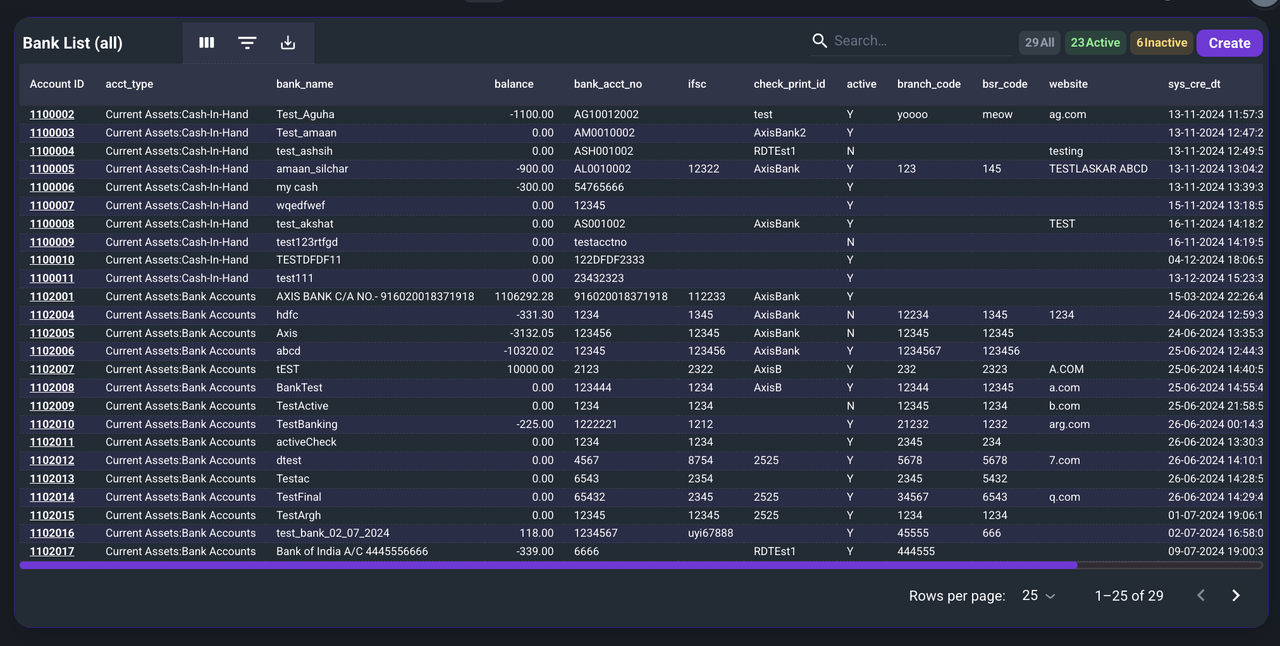
- From the Ace CBM dashboard, go to Asset/Bank > Bank List.
-
View Account Categories
- By default, the system displays all Active bank accounts.
- Toggle between Active, Inactive, or All to filter accounts as needed.
-
Search and Filter Accounts
- Use the search bar to locate specific accounts by Bank Name, Account ID, or Branch Code.
- Apply filters to refine the view based on attributes like account type or balance status.
-
Export Account Data
- Click on the Export button to download the bank account list in your desired format for external use or reporting.
Benefits of the Bank List Module
- Centralized Financial Management: Provides a single view of all bank accounts for easy monitoring.
- Enhanced Accuracy: Ensures precise tracking of account balances and details.
- Improved Financial Reporting: Facilitates seamless reporting and reconciliation.
- Streamlined Workflows: Integrates with payment and accounting modules for efficient financial operations.
The Bank List module in Ace CBM simplifies financial management by offering a structured and transparent overview of all bank accounts, ensuring seamless operations and informed decision-making.