Project Workspace Layout
The Project Workspace is designed as a single-page visual timeline workbench centered around the Gantt schedule. All secondary resources are accessed via drawer and modal overlays.
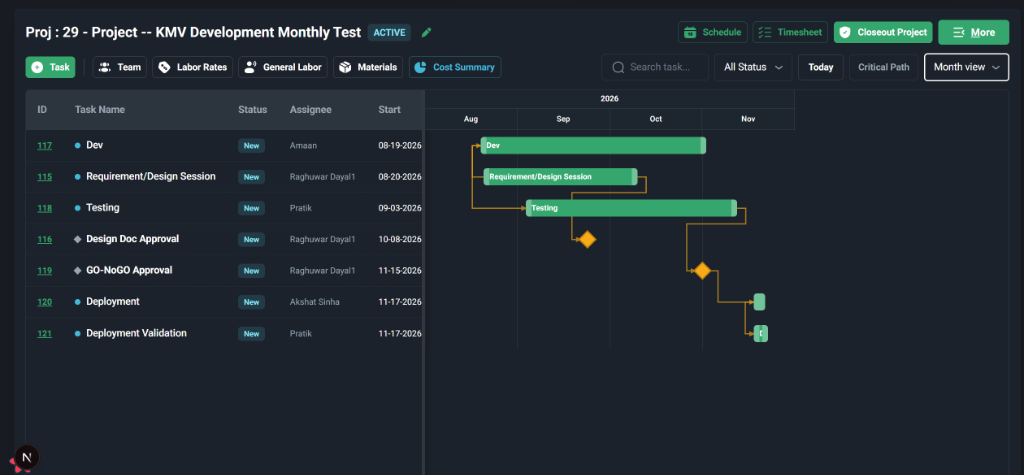
Workspace Controls & Elements
The workspace header and main workspace area contain the following controls:
1. Top Action Toolbar (Left)
Direct drawer and modal overlay buttons for managing supplementary planning data:
+ Task: Opens the Task Details side panel to create or schedule a new task.Team: Opens the Project Team & Assignments overlay. This shows assigned members, roles, effective dates, and lets you add new team members.Labor Rates: Opens the Role Cost Rates card drawer.General Labor: Opens the Project & Task Labor Estimates overlay drawer (specifies role-based monthly, weekly, or total hour baselines).Materials: Opens the Materials Requirements & Issuances details list.Cost Summary: Slides out the Project Financial Health side drawer containing budget margins, setup details, and the Planned vs. Actual Role Hours analytics card.
2. Top Action Toolbar (Right)
Includes helper actions to manage timesheet approval, scheduling, and project closure:
Schedule: Adjust scheduling rules or recompute timelines.Timesheet: View or log timesheet entries linked to project tasks.Closeout Project: Promotes the project status toDONE(if checklist criteria are met).More: Access secondary functions (e.g., duplicate project, delete, audit history).
3. Interactive Gantt View (Main Area)
The primary timeline workspace:
- Left Pane (Task List): Displays the project task lists, codes, statuses, and durations.
- Right Pane (Timeline Canvas): Displays visual calendar timeline bars representing schedules, dependencies, and progress milestones.
Related Documents
- Return to overview: Project Overview & Lifecycle
- Enter labor estimates and rates: Labor Planning & Cost Rates
- Use the Gantt chart interactively: Task Scheduling & Gantt Chart
- Manage bill-of-materials: Materials & Supply Tracking
- Assign project members: Team Assignments & Roles
- Step-by-step project guides: End-to-End Project Workflows